FOR ELEMENTARY & MIDDLE SCHOOL ENGLISH TEACHERS
AI was supposed to make lesson prep faster.
So why is it taking longer?
If you teach English with reading passages, this post is for you: how to turn the passage you already teach into vocabulary, reading, thinking, discussion and essay activities in one go.
You open an AI chatbot. You type a prompt.
Copy the answer. Paste it into a document. Fix the broken table. Make it look like a worksheet.
Two hours later, you still have one page, and your students need ten.
Who is Worksheet Studio for?
Worksheet Studio is not a "make me anything" chat box. It is built for one specific job: taking a reading passage you want to use in class and turning it into many different activities.
✓ A great fit if you…
- Teach English to students from Grade 2 up through middle school (ESL / EFL, international or local schools, academies, homeschool)
- Already have a passage: a textbook unit, a news article, a story, a science or history text
- Want more than "answer the questions": vocabulary, deeper reading, thinking, discussion and writing
- Need print-ready pages, not a wall of chatbot text
✗ Probably not what you need if you…
- Want one quick quiz with no passage at all
- Expect the tool to choose a topic for you ("make something about animals")
- Need content for very young learners who are not reading full passages yet
How it works
- Paste your passage. Use the text you are actually teaching this week.
- Pick the grade and the activities. Keep the ones you need, remove the ones you don't.
- Download a print-ready PDF. Clean, colorful layout, an answer key included, ready for class.
What one passage becomes
Here is what a single nonfiction passage turned into, in one workbook, grouped the way a lesson actually flows:
Word Check
Chunk Reading
Put It in Order
Creative Writing
AI Image Mission
Plan
Final Draft
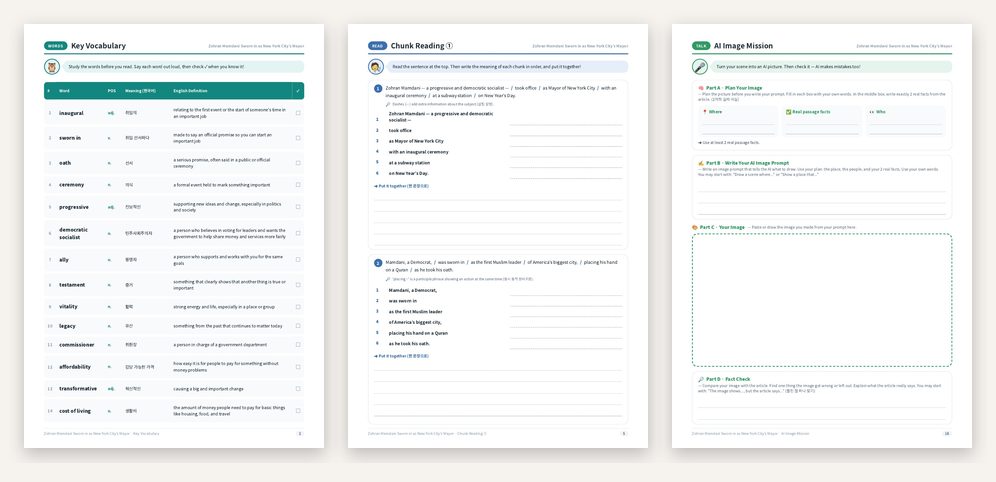
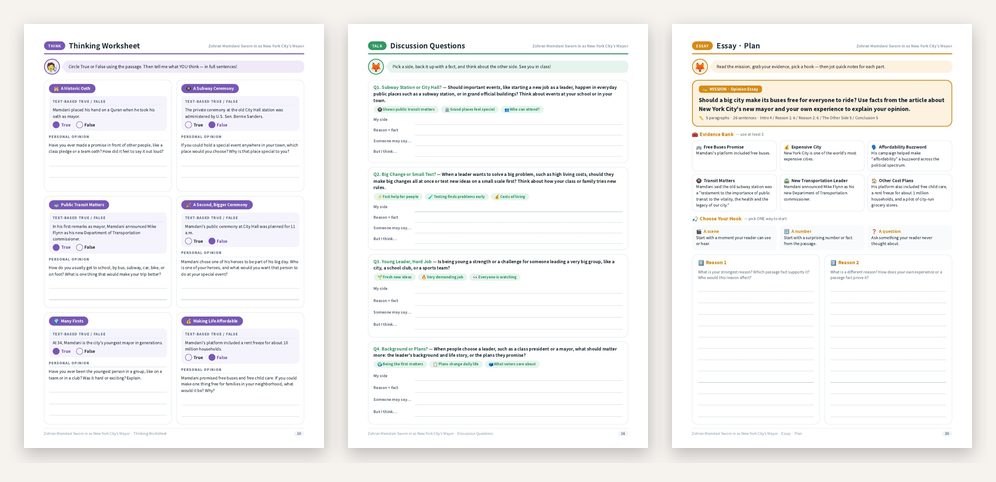
Plus a teacher answer key at the end. Use the whole set across a week, or pull out just the pages you need for one lesson.
Students wrote the essay. Now what?
Marking only what is wrong with a red pen feels incomplete. The student sees the mistakes, but still doesn't know what to add, or where.
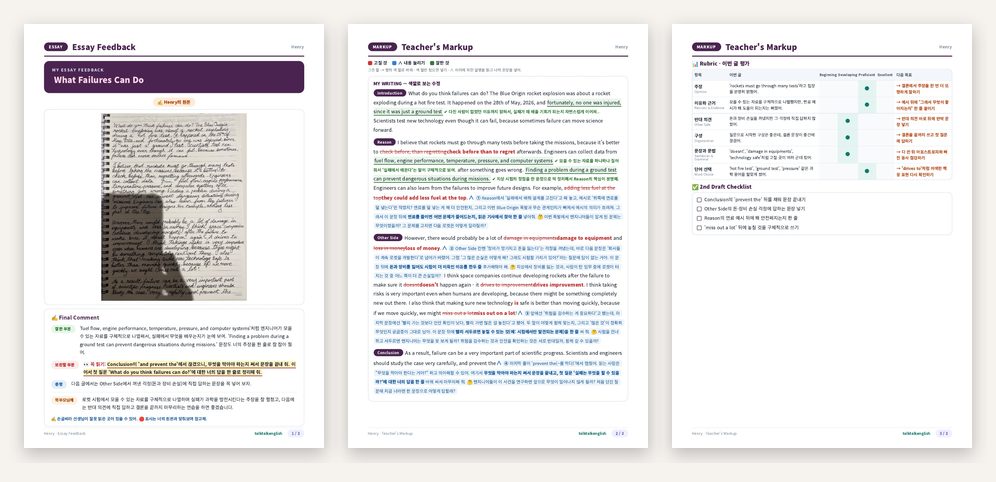
Worksheet Studio's Essay Feedback starts from a photo of the handwritten essay and gives back a report students can actually follow:
- Color-coded markup right on the student's own sentences
- Socratic questions at the exact spot where an idea needs more, so students think instead of copying a model answer
- A rubric and a 2nd-draft checklist
- A clean, kid-friendly design that students are happy to read
Get better results: bring the passage
The most common request we see is something like "make this" or "make a worksheet about animals". The tool works best when you give it the real text you are teaching.
| Vague request | Better request |
|---|---|
| "Make a worksheet." | Paste the 300-word article your class reads on Monday and choose Grade 5. |
| "Something about animals." | Paste the textbook passage about animal migration you are teaching this unit. |
| "Make it fun." | Keep Discussion Questions, Creative Writing and the AI Image Mission; remove the rest for a lighter lesson. |
Built in Korea, used by teachers around the world
Most of our subscribers teach outside Korea. Teachers in very different classrooms use the same workflow: one passage in, a full set of activities out, so they can spend their time teaching instead of formatting.
Quick questions
Which grades is it for?
Elementary and middle school readers, roughly Grade 2 to Grade 8. You choose the grade, and the activities adjust.
Can I use my own textbook or a news article?
Yes. That is exactly how it is meant to be used. Paste any passage you are allowed to use in your class.
Is it printable?
Yes. Every worksheet set downloads as a PDF with an answer key.
Is there a free plan?
Yes: 2 worksheets and 2 essay feedback reports per month for free. Paid plans start at $19.99 a month.
Try it with the passage you teach next
2 worksheets and 2 essay feedback reports free every month.
Start free at worksheetstudio.store →